CellarSync

CellarSync/Features/Depletions table

All your depletions in one layout

Every row from every distributor lands in the same table, with the same columns. Search it, filter it, open a row to fix it, or export it.

One click, no account. The data belongs to a fictional winery; you get your own copy, and it resets after 45 idle minutes.

Depletions tablecellarsync.techma.ai/app
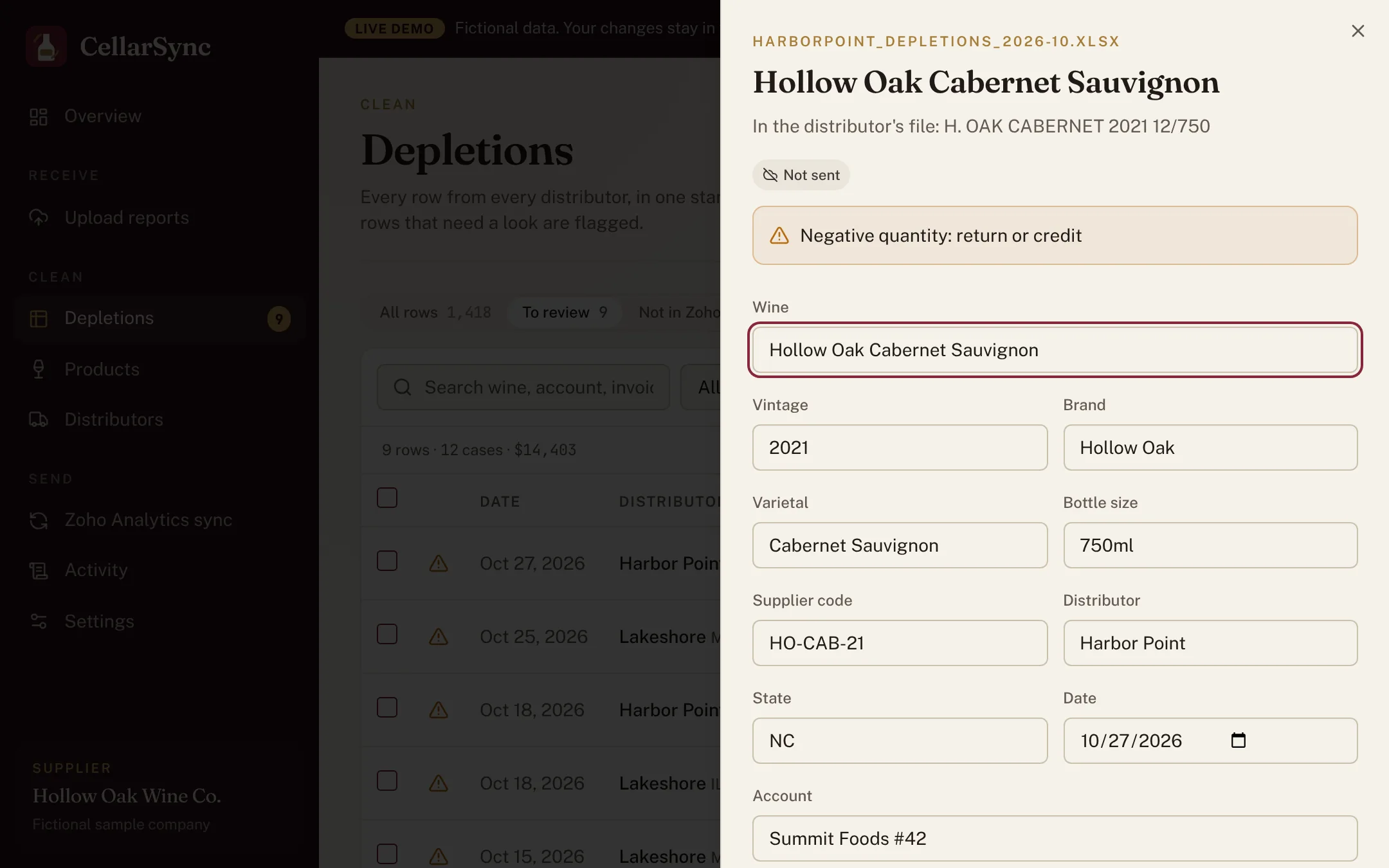
A depletion row opened for editing: wine, vintage, brand, distributor, state, account, cases and value

Find any row

Search by wine, account or invoice, and filter by distributor, state, month and status: all rows, rows to review, or rows not yet in Zoho. The totals of cases and value follow the filters.

Edit in place

Open a row to see the description as it was in the distributor's file and correct any field. A changed row goes back to Zoho with the next sync.

Delete and export

Delete one row or a selection, with a confirmation. Export the filtered rows to CSV for anyone who wants them in a spreadsheet.

On a phone

Rows become cards with the wine, distributor, account, date and cases, so a sales manager can check a number from the road.

Live demo

Pour a report in. Watch it come out clean.

CellarSync is a working application, not a mock-up. Upload a sample distributor file, check its columns, fix the rows it flags and run a sync to Zoho Analytics as a dry run.