Live demo · fictional winery
Depletion reporting software for wine suppliersEvery distributor's report, one clean ledger.
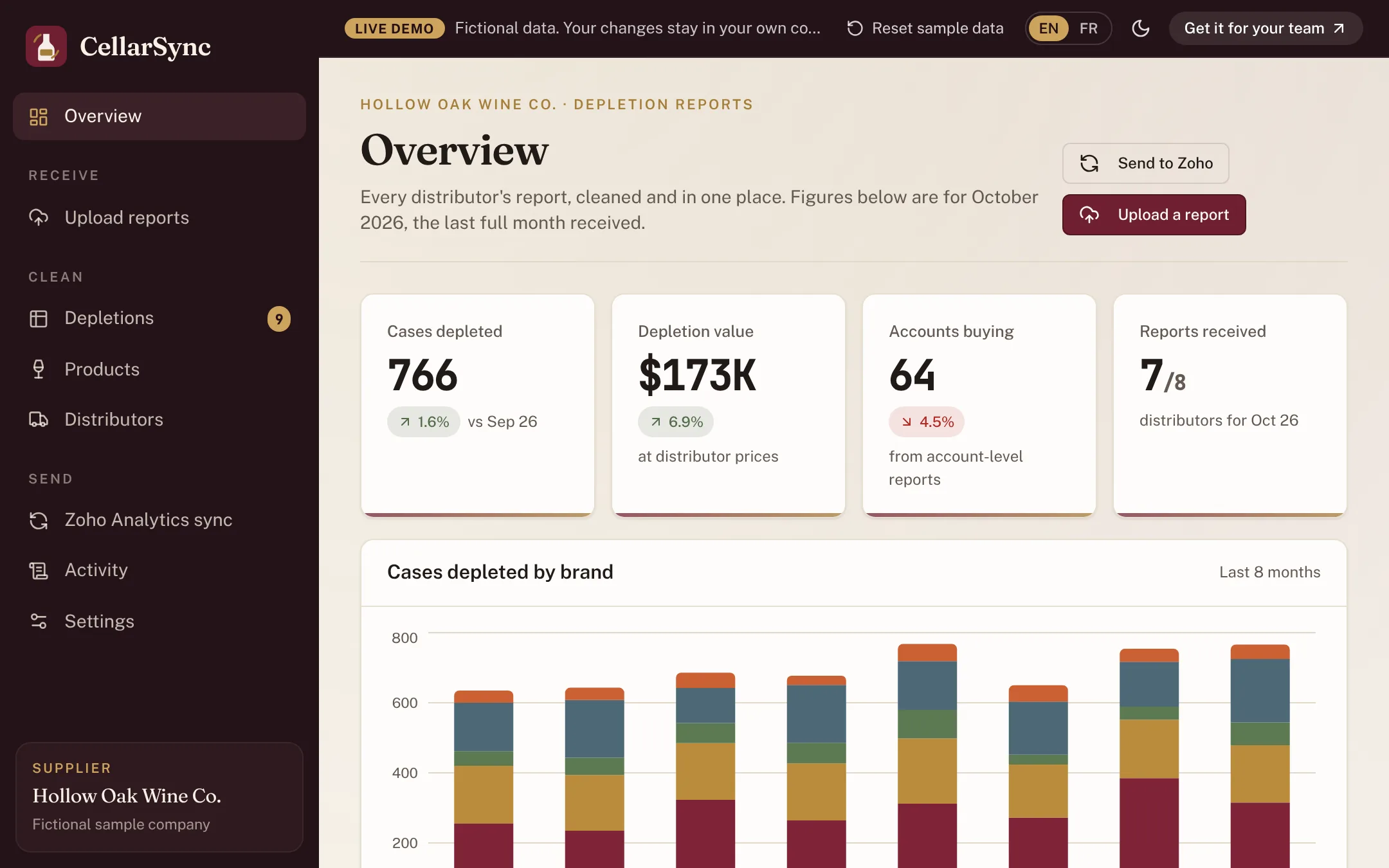
Each distributor sends depletions in its own layout, with its own names for your wines. CellarSync reads every file, matches each line to your catalogue, flags what needs a look and sends the clean rows to Zoho Analytics, where your dashboards read them.
One click, no account. The data belongs to a fictional winery; you get your own copy, and it resets after 45 idle minutes.
- Distributors
- 8each with its own layout
- Rows
- 1,400+nine months of depletions
- Checks
- Every rowbefore anything is sent
- Languages
- EN · FRon every screen
01The monthly chase
Eight distributors, eight ways to say the same thing
Depletion reports are the only view a supplier has of what sold through to stores and restaurants. They also arrive in every possible shape.
Every layout is different
One sends an Excel export with sixty columns, another a CSV with eight, a third a scanned PDF. Column names change between them, and sometimes between months.
Your wines have many names
"HOLLOW OAK CAB SAUV NAPA 21 750" and "H. OAK CABERNET 2021 12/750" are the same wine. A spreadsheet does not know that until someone tells it, every month.
Errors travel to the dashboard
A missing vintage, a return entered as a sale or a row with no state goes straight into the totals the sales team reads, unless someone checks first.
02What it does
Nine parts, one path
From the file a distributor sends to the table your dashboards read.
- 01Report uploadDrop a distributor's report as it arrives: Excel, CSV or PDF.
- 02Column checkEach column of a report is matched to a standard field before import.
- 03Product mappingEach distributor's item description, matched once to one of your wines.
- 04Row checksEvery row checked before it can be sent.
- 05Depletions tableEvery row from every distributor, in one layout you can search and edit.
- 06Report trackerWhich distributor sent which month, and what is still missing.
- 07DistributorsWho reports, in what format, for which states, and how sales move.
- 08Zoho Analytics syncClean rows sent to one Zoho Analytics table, by hand or every day.
- 09Activity logEvery report, check and sync, in the order it happened.
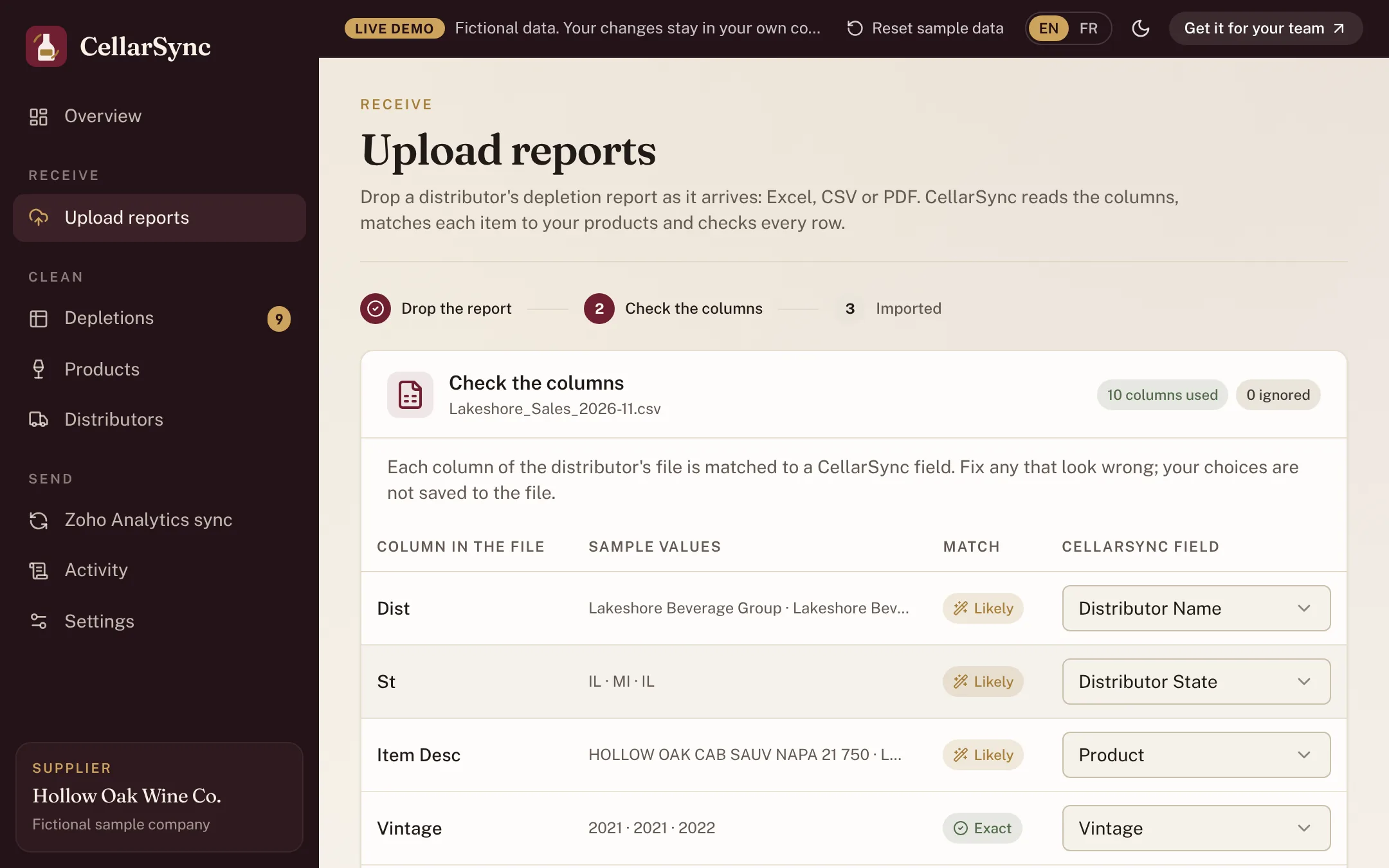
Upload and column check
Drop the file as it arrives
CellarSync reads the columns of each report and matches them to a standard layout of about sixty fields. Known names match on their own; you confirm or change the rest before a single row is imported.
- Excel, CSV and PDF reports
- Exact matches and likely matches shown apart
- Duplicate rows skipped on import
Product mapping
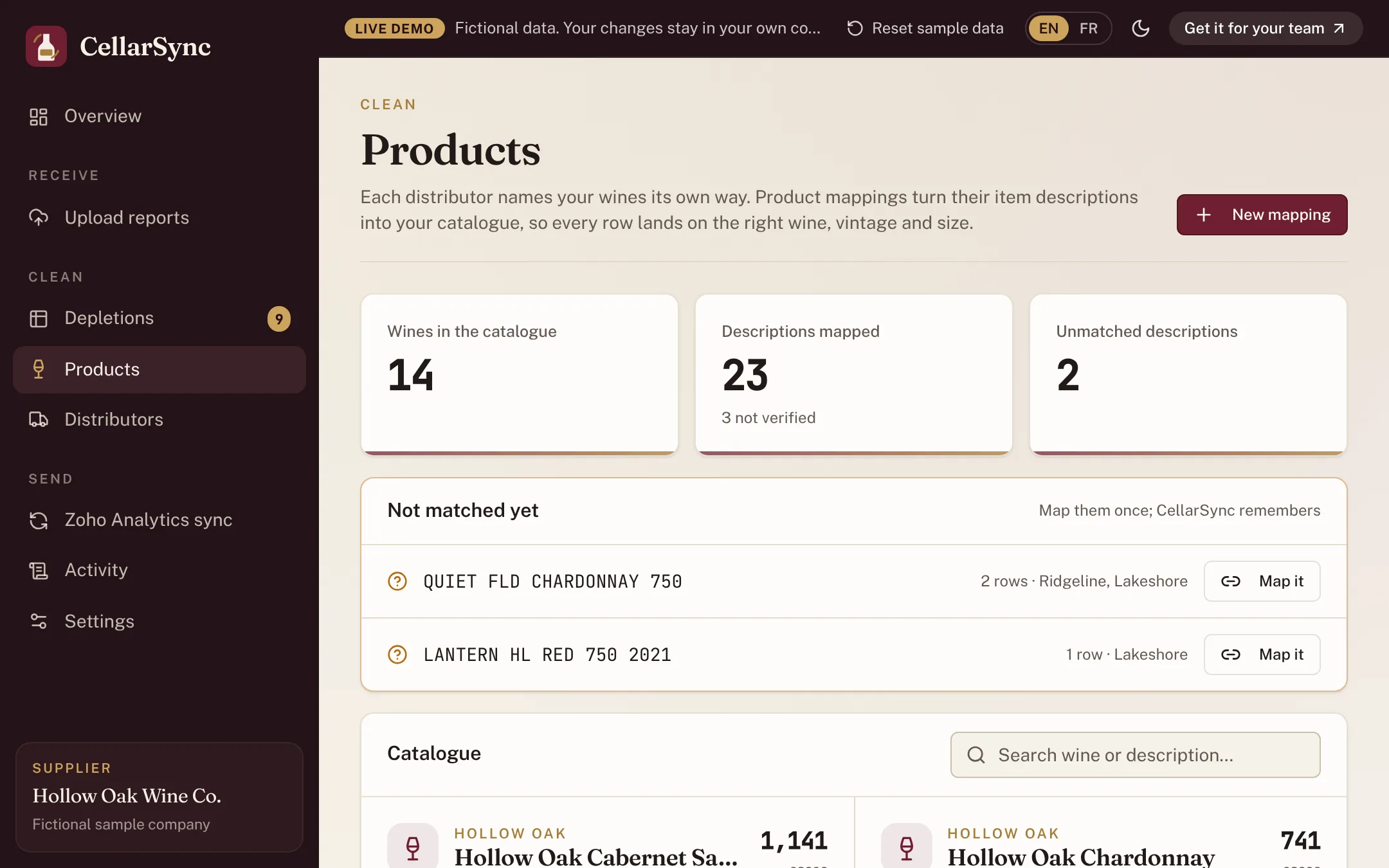
Teach it your wines once
Each distributor's item description is mapped once to a wine in your catalogue: name, vintage, size, brand and code. Every past and future row with that description lands on the right wine.
- Unmatched descriptions listed with their row count
- Mappings verified or waiting for a check
- Flagged rows pass as soon as the mapping exists
Checks and sync
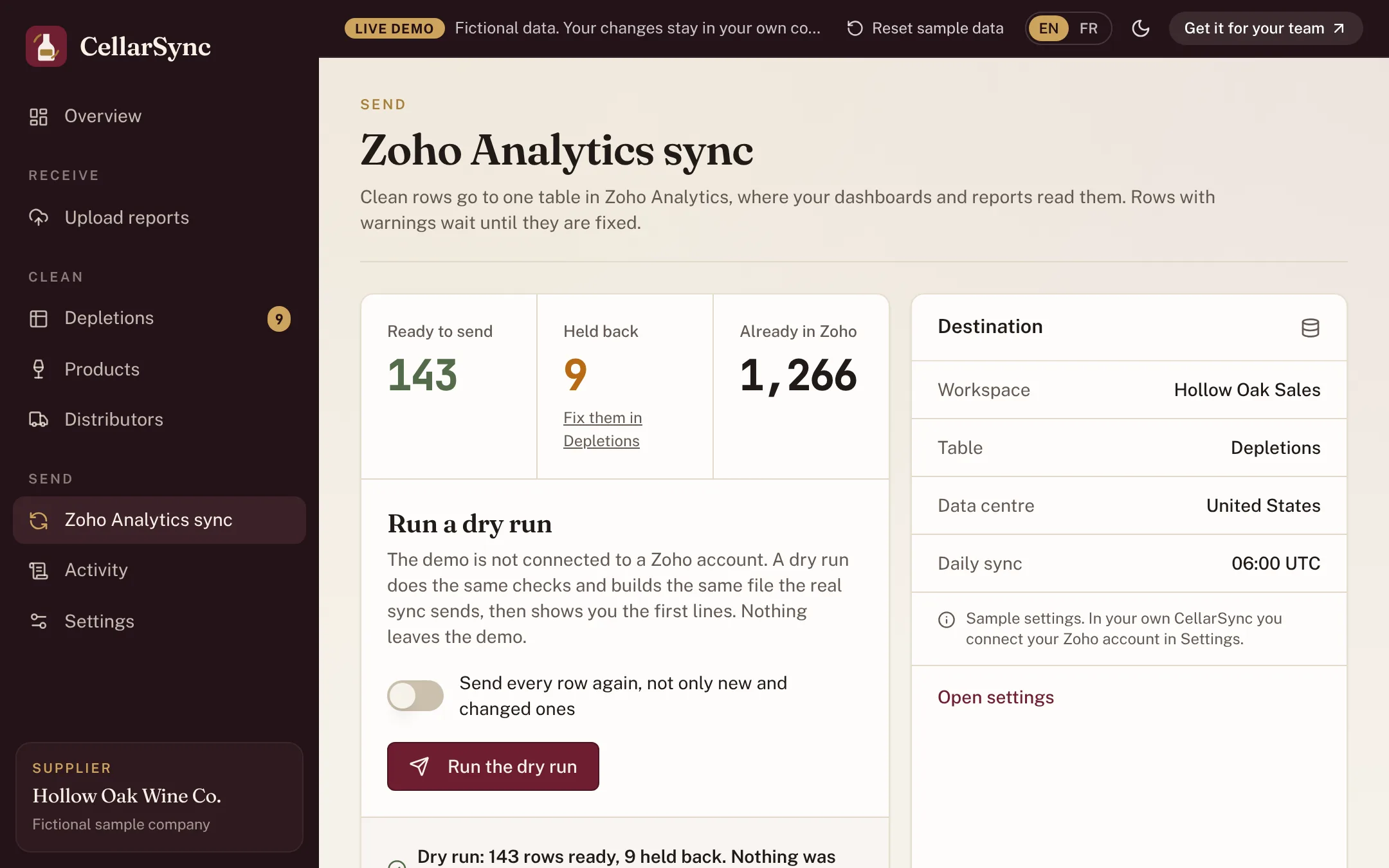
Only clean rows reach Zoho
Every row is checked: unmatched item, missing state or date, negative quantity. Rows that pass go to one Zoho Analytics table, updated by record so nothing is counted twice. Rows that fail wait in Depletions until fixed.
- Rows to review in one tab
- Edit a row in place; it is checked again
- Daily sync at the hour you choose
03How a report moves
Four steps each month
The same path for every distributor, whatever their file looks like.
- 1
Receive
The report is uploaded, or picked from a SharePoint folder, as soon as it arrives.
- 2
Read
Columns are matched to the standard layout and each item to one of your wines.
- 3
Check
Rows with a problem are flagged and fixed in place; the rest pass.
- 4
Send
Clean rows are sent to Zoho Analytics, by hand or on the daily schedule.
04Who it's for
For every team that waits on distributor data
Wineries
Estates selling through a handful to dozens of distributors.
Read more02Importers
Many producers, many distributors, one catalogue to keep straight.
Read more03Multi-brand suppliers
Several brands, several states, one view of what sold through.
Read more04Sales teams
Regional managers who need account-level numbers they can trust.
Read more05Finance and operations
Depletion value and volumes checked before they feed a forecast.
Read more06Sales and marketing agencies
Agencies that report depletions back to the brands they represent.
Read more05Get this app
Make CellarSync yours
Three ways to put this application to work on your own distributors and catalogue. Prices on quote.
Source code
Buy the application's code and run it with your own developers.
Price on quote
- The full application, front and back
- Set-up notes and a hand-over call
- Yours to change and host
Built for your team
TECHMA adapts CellarSync to your distributors, your catalogue and your tools.
Price on quote
- Your layouts recognised on their own
- Your checks, your destination, your sign-in
- Working versions from the first weeks
Hosted and managed
TECHMA hosts, updates and supports your version; your team just uses it.
Price on quote
- Hosting, backups and updates
- Changes when a distributor's layout changes
- Support by e-mail and video call
06Guides
Read before the next month-end
07Free tools
Quick answers, no account
Calculators and checklists for the numbers wine sales teams work out by hand.
9-Liter Case Calculator
Convert physical cases of any bottle size into 9-liter case equivalents, so depletions in different formats can be added up fairly. Free, no account.
Read more02Depletion Growth Calculator
Compare cases depleted in two periods and get the change in cases and in percent, month over month or against the same month last year.
Read more03Depletion Report Checklist
A printable checklist for each distributor depletion report: what to check when the file arrives, on every row and before you publish the month.
Read more04Months of Inventory Calculator
Divide a distributor's stock by its average monthly depletions to see how many months it would last at the current pace. Free, nothing sent to us.
Read more08Resources
More on depletion data
Articles, definitions, comparisons and the markets CellarSync is set for.
Blog
Articles for wine suppliers and sales teams on depletion reports, distributor data, item mapping, wine sales KPIs and reporting tools.
Read more02Glossary
Plain definitions of the words in distributor reports: depletions, shipments, 9-liter cases, on-premise, off-premise, three-tier system, account, chain, item mapping.
Read more03Comparisons
How a depletion reporting application compares with spreadsheets, third-party depletion data services, a BI tool on its own and a fully custom build.
Read more04Regions
CellarSync for wine suppliers selling through distributors in the United States and Canada, and for exporters whose importers report depletions.
Read more09Blog
Latest cellar notes
Questions
Asked before the first call
What is CellarSync?
CellarSync is a web application for wine suppliers who sell through distributors. It takes the depletion reports those distributors send (Excel, CSV or PDF), reads their columns into one standard layout, matches each item description to the supplier's own wines, checks every row and sends the clean data to a Zoho Analytics table.
Can I try it without creating an account?
Yes. The live demo opens in one click. You get your own copy of a fictional winery's data: upload a sample report, edit rows, add product mappings and run a dry-run sync. Your copy resets after 45 idle minutes.
Who built CellarSync?
TECHMA designed and built it as a custom application for a wine supplier. The client's name and data are not shown. What you see is the same software with fictional data and a new name.
Does it read PDF and scanned reports?
In a version for your team, yes: PDF and scanned reports are read with AI. That step is switched off in the public demo, which works with Excel and CSV sample files.
Does it only work with Zoho Analytics?
The application sends its clean rows to Zoho Analytics. Sending them to another tool, such as Power BI, a data warehouse or your CRM, is something TECHMA builds in a version for your team.
Is it available in French?
Yes. Every screen of the app exists in English and in French, and each person chooses their language.
Can our company get this app?
Yes, in three ways: buy the source code, have TECHMA adapt it to your distributors and tools, or let TECHMA host and manage it for you. The options are on the Get this app page; prices are on quote.
Live demo
Pour a report in. Watch it come out clean.
CellarSync is a working application, not a mock-up. Upload a sample distributor file, check its columns, fix the rows it flags and run a sync to Zoho Analytics as a dry run.